
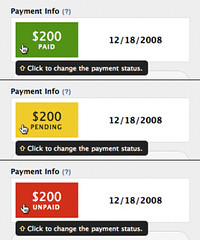
Here’s a small, but delicious feature nugget we’ve implemented for our friends utilizing Wufoo’s Payment Integration feature. In the [Entry Manager](/docs/entry-manager/), you can now change the status of our your payment by clicking on the Payment Info box. You can cycle through the following five payment statuses :
– **Paid**
– **Unpaid**
– **Pending**
– **Cancelled**
– **Refunded**
Please note that overriding the payment status in Wufoo, **does not** change the payment status on the merchant side or initiate any merchant actions on that payment. It only affects how Wufoo sees the status for that entry. For example, if you override the status from Paid to Refunded, your merchant **will not** issue a refund.
This feature is useful for Wufoo users that are providing flexible ways of handling payments for orders and events (like accepting checks via the mail), but still want to sync their entry data with their payment workflow and process.
Comments
This is great. Wish that the first click from unpaid cycled to paid, though!
Posted March 9th, 2009 by Aubrie.