
Hello fellow form builders! Inspired by some recent support requests and fueled by a Diet Coke frenzy, we’ve turned list of files in your Excel export into clickable links to directly access your entries’ attachments.
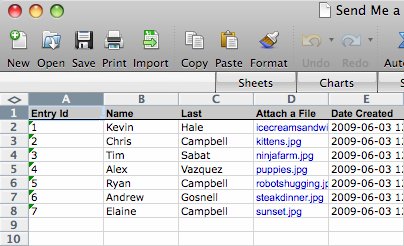
This means that if you’re collecting images or documents through your form, you no longer have to log into Wufoo to access your stored files each time you need them. Now you can export your data into Excel and follow clickable links to access your files whenever you want them.
And Excel is not the only export format receiving this upgrade. CSV and Tab-Delimited exports will also include the links as well, except they’ll just be the url to the file on our servers. While not clickable like their Excel brothers, these links are still helpful for machine-parsing your File Upload info data.
Comments
Yay! This is really helpful for us, thanks!
Posted June 3rd, 2009 by Emilie.Everyone needs a hug.
Posted June 3rd, 2009 by ivailo.Everyone needs a hug.
Posted June 3rd, 2009 by Y Gim niê.Hi!
What about in the API? How can I create a link to a form-uploaded file from the Query API response?
Posted June 3rd, 2009 by Vincent Olivier.