
Hey everyone, we’ve had quite a summer here at Wufoo HQ quietly toiling away on the awesome and we’re really excited now that everything is finally in place for us to start announcing our goodies to our favorite form friends. First order of business–New payment integration features!
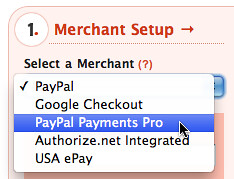
Some of you might have noticed that over the last few weeks Chris has silently released into the wild a number of improvements to our payment integration settings and workflows. In addition to some interface improvements, the backend has been completely rewritten to make it easier for us to add payment processors down the line. Today we’re announcing two new processors: [PayPal Payments Pro](https://www.paypal.com/cgi-bin/webscr?cmd=_display-pro-fees-outside) and [USA ePay](http://www.usaepay.com/), two of the largest and most trusted gateways on the Internet.
###Integrated Payment Workflow
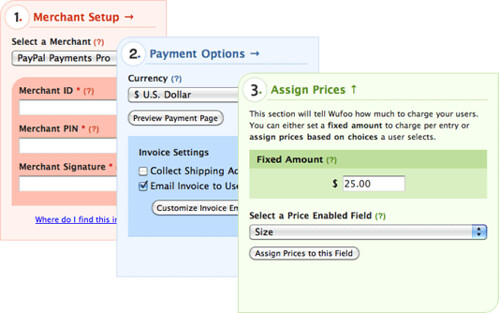
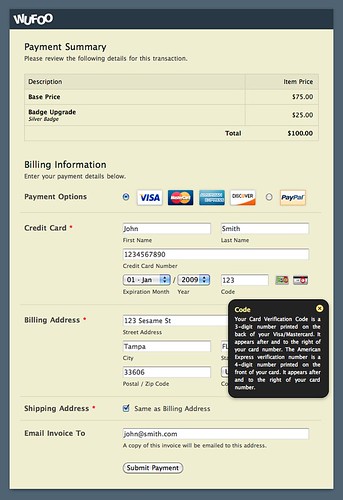
One thing our payment veterans will be excited to hear about with these specific integrations is that after a Wufoo form is submitted, the user will not be taken to another page on the processor or gateway’s web site. Instead, we’ve designed our own payment summary page so that your users will experience a seamless flow from data submission to payment collection. Watch this video to see the new integrated payment experience in action.
Because we liked this new workflow so much, we’ve also added an Authorize.net integrated workflow as well. If you’re currently using the old way with Authorize.net, you can easily switch over to **Authorize.net Integrated** in your merchant settings.
###New Integrated Payment Features
We did our best to create an integrated payment system that we think is one of the best ecommerce experiences your users can have on the Internet. Not only do we think it looks great, it comes with a number of powerful features:
– **No Redirect** – If you’ve embedded the form on your site, Wufoo doesn’t take you off your web page. The payment step happens seamlessly on your web site.
– **Payment Summary** – Your payment page presents all the charges associated with the choices they made on your Wufoo form so that they have all the information they need to verify and complete the transaction successfully.
– **Collect Shipping Address** – You can toggle your payment form to optionally collect a shipping address from the user. The payment form can automatically base it on the billing address or specify their own.
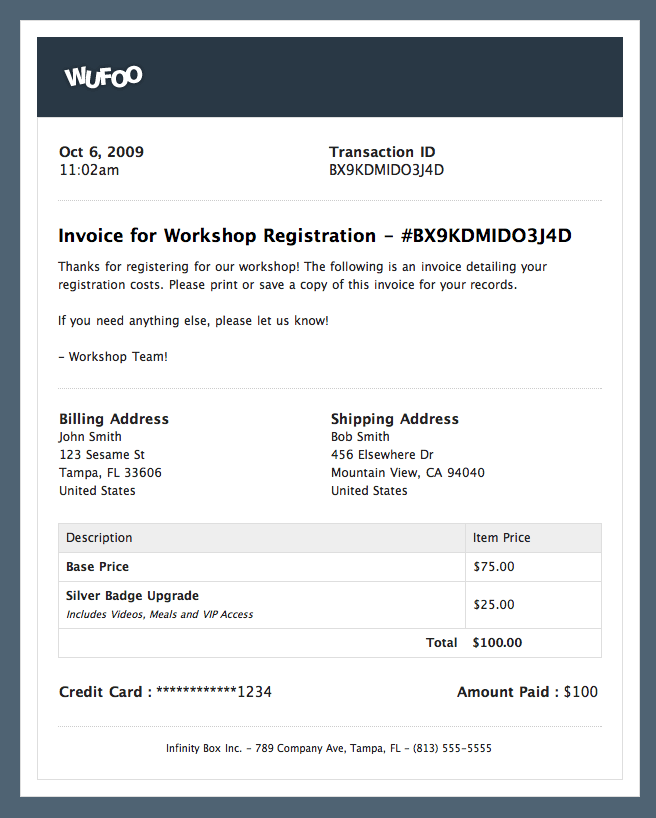
– **Professionally Designed Email Invoices** – You can have your payment form request an email address from your users so that they receive an invoice / receipt of the transaction for their records. These invoices can be customized with your own message, footer and data from our templating system. View sample invoice.
– **Live Previews** – No need to publish and submit test entries every time you make changes to your settings. Our preview features in the Payment Settings interface allow you to see how your themes, selections and copy affect your payment page and email invoices.
– **Theme Friendly** – Your payment page automatically matches the colors and branding you use with your Wufoo form. That means look of your tables and fields automatically coordinate their colors with your theme for a high quality, professional experience.
We’ve also beefed up our [Wufoo Powered Payments](/payments/) page to help us promote these new features to you, your friends and your colleagues. Please note that the new payment integration features are available to users on the **Bona Fide** ($24.95/month) plans and higher, but all users can try out payment integration for 5 transactions for free. To access these settings, just click on the **Payment** button under your form’s name in the Form Manager and start making money.
Comments
Everyone needs a hug. Thats really great news!
But does it support recurring billing?
Posted October 8th, 2009 by Victor.Sorry, Victor, but recurring billing is not supported.
Posted October 8th, 2009 by Chris Campbell.So is this new integrated payment being automatically added to our existing forms? Please say yes and I will love you forever. Currently, my registration form redirects to paypal, Id like for it to become integrated…
Posted October 8th, 2009 by Cesia Minemann.Regular PayPal does not redirect (it’s actually not possible with their API), but if you subscribe to their PayPal Payments Pro processing, you can use our integrated payment workflow to make that smoother.
Posted October 8th, 2009 by Kevin Hale.Wow. Awesome work. Well done. Is it possible to allow manual payment processing as well? I’ve found using wufoo for order forms only works if taking payment by credit card—is that still the case?
Posted October 8th, 2009 by Galen.Galen, I’m not quite sure what you mean by manual payment processing. I don’t believe the new system will help out, but if you could explain exactly what you’re looking for we can always think about it.
Posted October 8th, 2009 by Chris Campbell.what are the differences between usa & paypal? why would one choose one over the other?
Posted October 8th, 2009 by Trey.Trey, we intend to build a chart comparing the different processors, but the main differences are fees and that with USA ePay you’d need to set up a merchant account separate from a USA ePay account.
Posted October 8th, 2009 by Chris Campbell.Will this change allow us to reschedule when the automatic payments occour each month? We have PayPal Payments Pro but haven’t been able to use it with wufoo because we can’t schedule when the payments get charged (it won’t be they initial day the customers sign up but rather on the 3rd of each month after initial sign-up.) We weren’t able to change this before.
Posted October 8th, 2009 by Tricia Ulberg.Will I need to be PCI compliant if using an integrated form? One of the few reasons I use PayPal Web Payments Pro is to avoid the hassle of PCI compliance.
How does the integration affect this?
Posted October 8th, 2009 by Brian.Tricia : Currently, the PayPal Payments Pro integration doesn’t have recurring billing associated with this and so it’s not possible. In terms or rethinking our recurring billing features, we don’t have any plans for that at the moment, but it’s something we’ll consider.
Brian: These integrated payment flows actually store the data with the merchants and so none of the payment information sits on wufoo’s servers. Basically, this means you don’t have to worry about PCI compliance since the data is never stored on any other server besides the gateway/merchant’s.
Posted October 8th, 2009 by Kevin Hale.For Authorize.net, is every transaction still regarded as “Successful”- (even if the gateway declines it)? Basically, will we still need to double check every transaction on the gateways site? This used to be a “bug” before.
Posted October 8th, 2009 by Trevor.Trevor, that problem won’t happen anymore and payments will only be regarded as “Successful” if the payment is processed. The payment will be “Declined” if the transaction did not go through. Note that if you refund, void, or decline a transaction from inside the Auth.net interface wufoo will still show the transaction as “Successful”.
Posted October 8th, 2009 by Chris Campbell.Brilliant, well done as always guys.
(and now the feature request) We’d love to see CyberSource added as an possible gateway (they own Authorize.Net, but its not the same thing)
Take care,
Posted October 8th, 2009 by Boris Masis.– Boris
You guys kick ass.
This is by far a great service. One thing you should consider is how to integrate the PayPal 2.0 accounts.
We just signed up with it, because we want to bill clients for recurring subscriptions. It is PayPal’s newest offering but something they are beginning to heavily promote if you call in to set-up an older Payflow Pro account.
It is half PayFlow Pro Link and Website Payments. It allows you to have PayPal acts as the merchant and processor saving start-ups the hassle of having multiple accounts charging them fees for credit card charges.
Posted October 8th, 2009 by Steven Wagner.Will this work behind an https:?
Posted October 8th, 2009 by Steven Wagner.Please support PayJunction as soon as possible. Thanks for
Posted October 8th, 2009 by Tony.constantly improving a great app.
So what type of transaction fees would be involved with this? I’m assuming to receive the funds, we’d still be hit with the 2-4% transaction fee from the merchant account, right?
Posted October 8th, 2009 by Dave.Boris, Steven, Tony: We’re always considering new payment processors to add, but since there are so many out there they have to be somewhat highly requested before we’ll add a new one.
Steven: All payment pages are automatically converted to https://.
Dave: That depends on the merchant account and processor that you choose. wufoo does not charge a transaction fee, but the banks and processors do.
Posted October 8th, 2009 by Chris Campbell.Wow! This is excellent news! Great work guys!
Let me confirm that we need PayPal Payments Pro instead of the generic PayPal Website Payments Standard to take advantage of this integration, correct? By selecting PayPal as the merchant the form behaves as before with the redirect to the PayPal forms.
Posted October 8th, 2009 by Matt.There does seem to be a little confusion about PayPal’s offerings. They do offer recurring payments now, but it’s through their “Express Checkout,” which it looks like you have to integrate into shopping cart software. For those of us who just want to accept payment for a single subscription (for example, to a website) it’s unclear whether this could have been or could be in the future integrated with what you’re offering here.
Posted October 8th, 2009 by Jeremiah.Matt: Yes, you will need to sign up for PayPal Payments Payments Pro to take advantage of the fully integrated features. The standard PayPal integration has not changed at all and the user will be redirected to PayPal.
Jeremiah: We do support Express Checkout since its support is required when you integrate with PayPal Payments Pro. That said, We do not support any form of recurring billing with the new PayPal Payments Pro integration, so it will only be useful to collect a single payment.
Posted October 8th, 2009 by Chris Campbell.Any chances you’ll also add forms into the payment form?
For instance adding phone and email to the form so we can follow up with customers?
For the Paypal interested people, if you ask for a “Paypal 2.0” account it has Payflow Link and Website Payments and Pro features all wrapped into one.
For $59 (30 base + 29 for recurring payments) you have some great features:
Posted October 8th, 2009 by Steven.– No redirect pages like Google Checkout
– Recurring Payments unlike Google Checkout, Paypal Pro and other gateways
– No need for a payment processor from your bank (saved us $45)
– No need for a merchant account from your bank (saved us $30 more)
Everyone needs a hug.
Posted October 8th, 2009 by Steven.I currently use regular PayPal because I sell a product that has a recurring subscription.
However, I would like to use PayPal Payments Pro to sell a different product (which is not a subscription, just a one-time fee) and take advantage of the full integration with wufoo (This is VERY slick btw!).
Anyone know if this is possible to do within the same PayPal account? Or would I have to have a standard PayPal account and a separate PayPal Payments Pro account?
Thank you for your help.
Posted October 8th, 2009 by Ryan.Steven: You have to submit a form in order to get to the payment form. Any information that you would like stored should be collected in the original wufoo form.
Ryan: You might have to talk to PayPal about what you’re looking for on that one.
Posted October 8th, 2009 by Chris Campbell.Any ideas on using coupons?
Can this be built in to the first form and then passed along to wufoo/PayPal?
Posted October 8th, 2009 by Steven.+1 for recurring billing for Authorize.net.
Posted October 8th, 2009 by Alex Tran.Tip: you are using the term ‘merchant’ incorrectly, both in this post and in the service. The ‘merchant’ in paypal jargon is the shopkeeper. That is why I as a shopkeeper in paypal have a merchant id.
Yet, you say ‘select merchant’ when you mean ‘select payment provider’ and ‘we plan to add multiple merchants down the line’ when you mean multiple payment providers.
This might confuse your users.
Posted October 8th, 2009 by Ivo.I need to know more about the integrated payment workflow? Does the form notify me when they paid or do I need to go in and check for it?
Posted October 8th, 2009 by Benjamin.Steven: Sorry, but we do not have any system for dealing with coupons or discounts.
Ivo: Thanks for pointing that out and we’ll try and get all of those fixed.
Benjamin: There are a number of ways to receive and view your data, and I recommend taking our basic getting started video at http://wufoo.com/docs/getting-started/ to get a feel for better feel for how wufoo works.
Posted October 8th, 2009 by Chris Campbell.love the product, might want to re-edit your marketing text for the announcement. Looks like some of your text got deleted. just a FYI
Hey everyone, we’ve had quite a summer here at wufoo HQ quietly toiling away on the awesome ???????? and we’re really excited now that everything
Posted October 8th, 2009 by brian curtis.I was hoping that I was not the only person to make this mistake, but, when you first published this blog post I read this line with a lot of excitement:
“One thing our payment veterans will be excited to hear about with these specific integrations is that after a wufoo form is submitted, the user will not be taken to another page on the processor or gateway’s web site.”
So I immediately upgraded my account and went through the hoops with Google Checkout. But after a lot of research throughout wufoo docs, forums, and rereading this post and comments, it appears that I am wrong, and Google Checkout means that the user will be taken to a page on the google Checkout site.
Posted October 8th, 2009 by Lauren.It seems like every time I log into wufoo there is something new or a slightly polished interface element. Great job as usual.
Posted October 8th, 2009 by Jay Owen.How about setting up transactions for “authorize only?” Is that done through the payment gateway and does wufoo support this?
Posted October 8th, 2009 by Leon.Sorry, Leon, but all transactions will authorize and capture, which basically means a charge will always be initiated after payment information is submitted.
Posted October 8th, 2009 by Chris Campbell.Hey guys is there any way to add tax on the assign prices field? A percentage would be best owing to different tax rates around the world. For Example Current Total then a plus tax field.
Posted October 8th, 2009 by Brent.Everyone needs a hug.
Posted October 8th, 2009 by Ruslana.I’d like to put in another vote for Payjunction. We’re already heavily invested in their online, mobile and hardware system. Thanks.
I worked with the authorize.net integration for a client and found it to be quite elegant and easy to use. Great work! I look forward to hearing about new integrations.
Posted October 8th, 2009 by Jamie.I want to be able to get addresses from form users… is there anyway that you can add a check box on the payment page that asks if billing address is the same as previously entered? I would ABSOLUTELY LOVE THIS! I know many other would too!!
Posted October 8th, 2009 by Ryan Gordon.I just don’t know what to say. I am so happy I just don’t know where to start. So, for now, I will just float in the warmth of the moment.
Posted October 8th, 2009 by Jim.Here’s another vote for PayJunction. They are our gateway and are fully integrated into our client tracking and accounting software program. I would LOVE to use wufoo to allow my clients to pay online!! Go guys go!!!
Posted October 8th, 2009 by Michelle.Hi guys. My clients need to be able to prepay for an order that would be placed in the FUTURE (the order for the future would be brought to us by their child at school as a fundraiser). Is there anyway to allow them to enter the amount they need to pay rather than having to select products or amounts from a list? Each client has the possibility of having completely different order amounts.
Posted October 8th, 2009 by Michelle.hi,
Posted October 8th, 2009 by Chai.do you support Clearpay Processing? i think its the same kind of company like Authorize.net
New user. So far, so great! I too would like to be able to authorize only and capture later.
Posted October 8th, 2009 by Anne.Hi- this would be perfect for me if it could authorize only and capture later as well. Any thoughts on if this could be done?
Posted October 8th, 2009 by NK.Everyone needs a hug.
Posted October 8th, 2009 by ahmad sihabudin.I’m on the wufoo free plan now and I’m a new user. Lots of great tools here, but my primary interest is in Paypal Pro recurring billing and discount/coupon functionality. Is there anything new to report on this?
Posted October 8th, 2009 by Kevin.Kevin, we hope to allow for negative price values pretty shortly, and you will be able to use that in conjunction with logic/branching to create a basic coupon system.
As to recurring billing, I’m afraid that while we do want to support that functionality, we still have yet to start development.
Posted October 8th, 2009 by Chris Campbell.is that new service of paypal?
Posted October 8th, 2009 by Ruban.http://divine-relation.com
Can you except checks with USA ePay?
Posted October 8th, 2009 by Tim.I’m sorry, Tim, but we only support the eCheck integration with Authorize.net at this time.
Posted October 8th, 2009 by Chris Campbell.Hi,
Posted October 8th, 2009 by Jeremy Snavely.Is it possible that I can have a copy of the customer’s email invoice sent to me? The problem I’m having is that Paypal doesn’t seem to keep the billing address information submitted from wufoo for the credit card authorization and I need a record of the billing address. It looks like that information is on the invoice sent to the customer.
Yes, you are very much right, you cannot open a PayPal account for Charity, if your charity is registered in India, same thing happened with me also, I applied a Charity account for my client and after completing all the formalities they just denied for the account.
Posted October 8th, 2009 by ritikaa.I have a suggestion for you, apply for a normal account with some other website and then use it for your Charity website, I have list of websites who are doing the same thing.
You can also try some other Payment Gateways like CCavenue, but in case you are using Vbulletin script, I don’t think so that it may help you. The first suggestion may work for you.
You you could change the page name wufoo Blog · Say Hello to PayPal Payments Pro and USA ePay to something more catching for your subject you write. I liked the blog post withal.
Posted October 8th, 2009 by Schedule.Awesome, I like it. Very well done. I liked your blog.
Posted October 8th, 2009 by Paypal Bangladesh.Hello! I am glad to join you.
Posted October 8th, 2009 by DarrenTub.